

In my last article I wrote about using specs to drive agents developing software. The goal is to observe what happens and discuss the implications, good and bad.

For that reason, I chose a supposedly simple specification: the canonical TODO app. This app has a specification documented at todomvc, a project originally designed to compare various MVC JavaScript/TypeScript frameworks. Remarkably detailed for its purpose of evaluating an “MVC” framework for web applications, it outlines very specific requirements. This level of detail itself carries implications we’ll explore further. For this lab, I removed all “web” related elements from the specification, including its insistence on specifying CSS class names and their usage. The stripped-down Markdown version of the specification below.
# TODO app specification

This is a specification for a todo app to create an easy to use and correct todo application.

## Functionality

### Global
The input control should be above any todos and prominent for easier visual attention.

### No Todo State
When there are no todos, focus on [INPUT] control to enter one.

### Entering Todos state
1. The todo is a text with preceding and succeeding whitespace trimmed.
2. Pressing [ENTER] creates todo, appends it to a todo list and clears the input.

### Marking Todo complete state
1. [CLICKING] the [CHECKBOX] next to a [TODO]
2. Completed TODOs should have a visually distinct style compared to an incomplete one

### Editing a Todo state
1. [DOUBLE CLICKING] an existing [TODO] should load the todo title in the [INPUT] for editing. Any edits subsequently following (1) of Entering todos will proceed using [ENTER] to update the relevant TODO

### Deleting a Todo
1. All Todo items in the list will have a [DELETE] option
2. Selecting that will [DELETE] the TODO item and update the list.

### Persistence
1. The applications provides a storage for todos app
It’s worth noting the deliberate use of certain words in the spec like “easy to use” and “correct”. However, unlike traditional coding this is a very naive and underspecified use of these terms. What even does “ease of use” mean? And what is “correct”? These concepts have significant implications for the agent’s interpretation based on its trained weights.
I intentionally omitted parts of the original spec regarding bulk todo editing and counters to show completed/open todos. This allows us to later add these features to the spec and observe how the agent evolves the code.
Now, for the actual implementation, I initiated a fresh agent session and provided it with my handwritten spec.md file along with the prompt.
Implement @spec.md as a TUI
Here, TUI narrowed down what the nature of the application is: Terminal User Interface, which in turn is a very specific type of application that can be run in a terminal.
Also, let’s pay attention to things that were not specified in the spec.md: no programming languages, tech stacks, frameworks, databases, is it a SaaS product, etc.
It did have, though, some specific words that triggered the implementing agent to pick some choices for all those.
Et voilà, it baked an TUI app, shown below along with an explanation of why it did it this way.
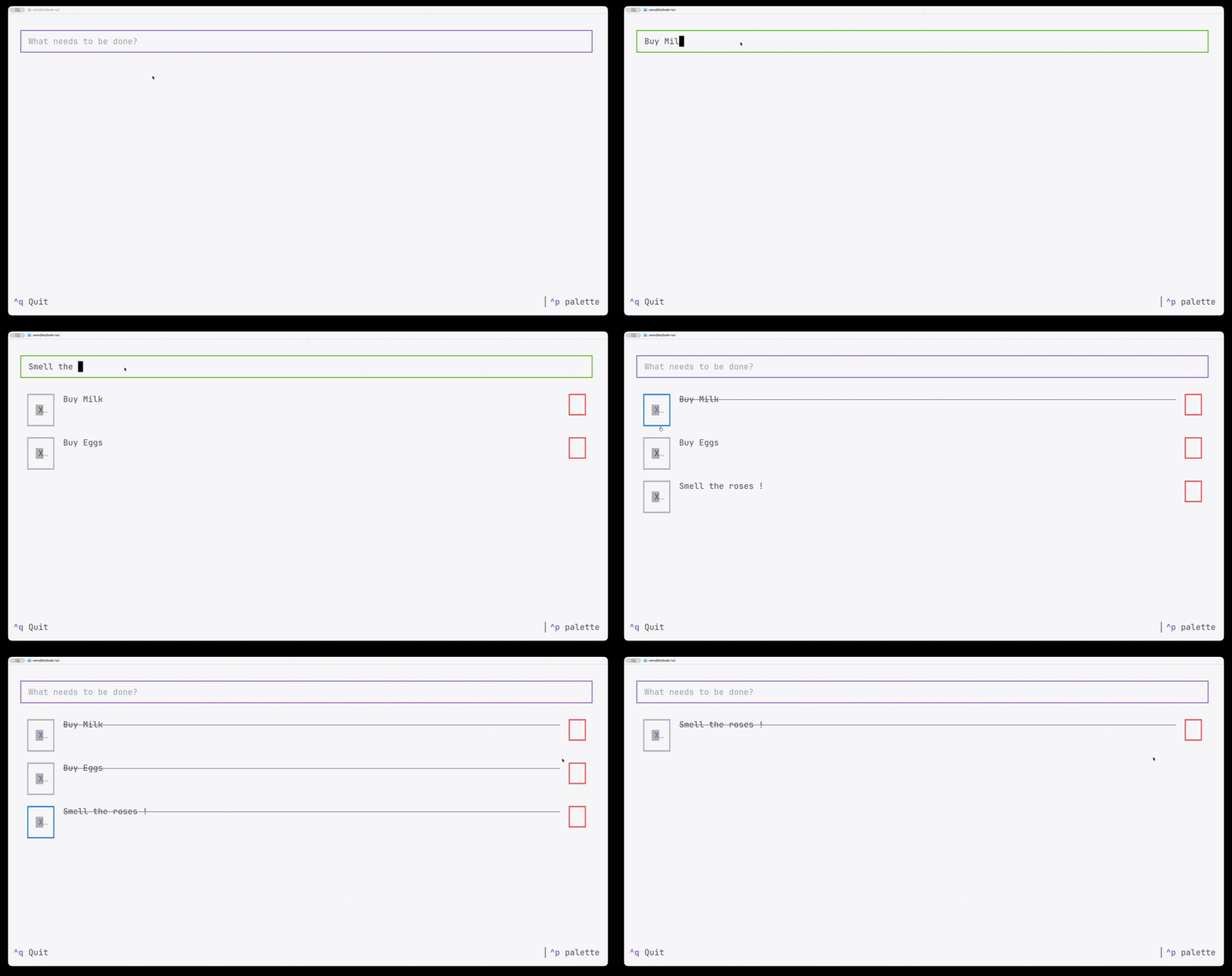
It mapped some parts of the specs directly to the choice of frameworks to use and defaulted the other parts based on the weights of its data. Python as the language of implementation, Textual a framework for building TUIs with mouse support, which is not common in a TUI framework. But it was chosen as the spec had the word SELECT and DOUBLE CLICK, implying the need for mouse support.
The implementation artefacts were quite simple.
├── pyproject.toml
├── README.md
├── spec.md
└── todo_tui
    ├── __init__.py
    ├── __main__.py
    ├── app.py
    ├── app.tcss
    ├── models.py
    └── widgets.py

2 directories, 9 files
Though it missed the tests that it claimed it wrote and ran in the repo, an oversight it claimed to fix after pointing it out.
The app completion summary written to the README.md had the following completed checklist, which I insisted be written in a specific format.
## Feature List

- Prominent input above the list — Status: completed; Notes: docked to the top of the screen with a heavy border so it stays visually distinct from the list below it.
- Focus input whenever no todos exist — Status: completed; Notes: applied on startup and again after the last todo is deleted.
- Trim whitespace on entry — Status: completed; Notes: leading and trailing whitespace is stripped before a todo is created or updated.
- Enter creates a todo, appends it, and clears the input — Status: completed; Notes: a blank submission after trimming is silently ignored.
- Click the checkbox to mark a todo complete — Status: completed; Notes: built on Textual's Checkbox widget and its Changed message.
- Completed todos are visually distinct — Status: completed; Notes: strikethrough text plus a muted color.
- Double-click a todo to load it into the input for editing — Status: completed; Notes: detected via the Click event's chain length reaching 2.
- Enter while editing updates the todo instead of appending a new one — Status: completed; Notes: tracked with an editing_id on the app, cleared after submit.
- Every todo has a delete option — Status: completed; Notes: a small button on each row removes just that row.
- Todos are persisted to storage — Status: completed; Notes: written as JSON to ~/.todo-tui/todos.json on every mutation, loaded on startup.
Lessons learnt
A simple spec is enough for a simple implementation. The less you specify, the more you get in terms of choice of implementation. At the cost of choices that aren’t in your control. Whether that matters is a matter of context and taste. I thought the UI looked ugly but functional. For the next lab, let us add a feature to the spec and evolve the code under consideration.